
Automated player journeys in iGaming are multistep CRM workflows for eligible casino or sportsbook players. They use triggers, entry checks, waits, conditions, branches and actions to respond to changing player activity. A journey can stop when its goal is complete or the player becomes ineligible.
This guide is for CRM managers, retention teams, VIP teams and product buyers. It explains how to design a journey, manage participation, check permissions and test each path. However, automation still needs approved rules, reliable events and clear ownership of the systems that execute each action.
Key Takeaways
- 01Define the decision before the messages.Start with a specific audience, purpose and measurable goal.→
- 02Separate entry from execution.A player who qualifies at entry may become ineligible before a later action.→
- 03Control waits and repeat participation.Set timeout, re-entry and exit rules before publishing.→
- 04Test the complete workflow.Review failure paths, changing player states, versions and outcomes alongside the successful path.→
What Is the Difference Between a Campaign and a Player Journey?
A campaign usually coordinates communication for a defined audience or moment. In contrast, a journey manages how an individual player progresses over time. Campaigns can also contain automation; the useful distinction is whether later behaviour changes the player's next step.
| Decision | Campaign | Automated player journey |
|---|---|---|
| Starting point | A selected audience, schedule or event | A qualifying event or audience change, followed by entry checks |
| Progression | Usually one coordinated execution | Waits and decisions that respond to later activity |
| Suitable use | Announcements and defined promotions | Onboarding, retention, reactivation and personal review |
| Measurement | Campaign exposure and response | Player progression, goals, exits and outcomes |
For example, a sportsbook campaign may announce an upcoming event to an eligible audience. A journey is useful when the follow-up depends on each player's later activity. If the intended action occurs, the player can exit instead of receiving another reminder.
Campaigns and journeys can work together. A campaign may introduce an initiative, while a journey manages the response-dependent follow-up. For a product example, Chanova iGaming CRM software connects player context, audiences and reviewed lifecycle workflows.
How Does an Automated Player Journey Work?
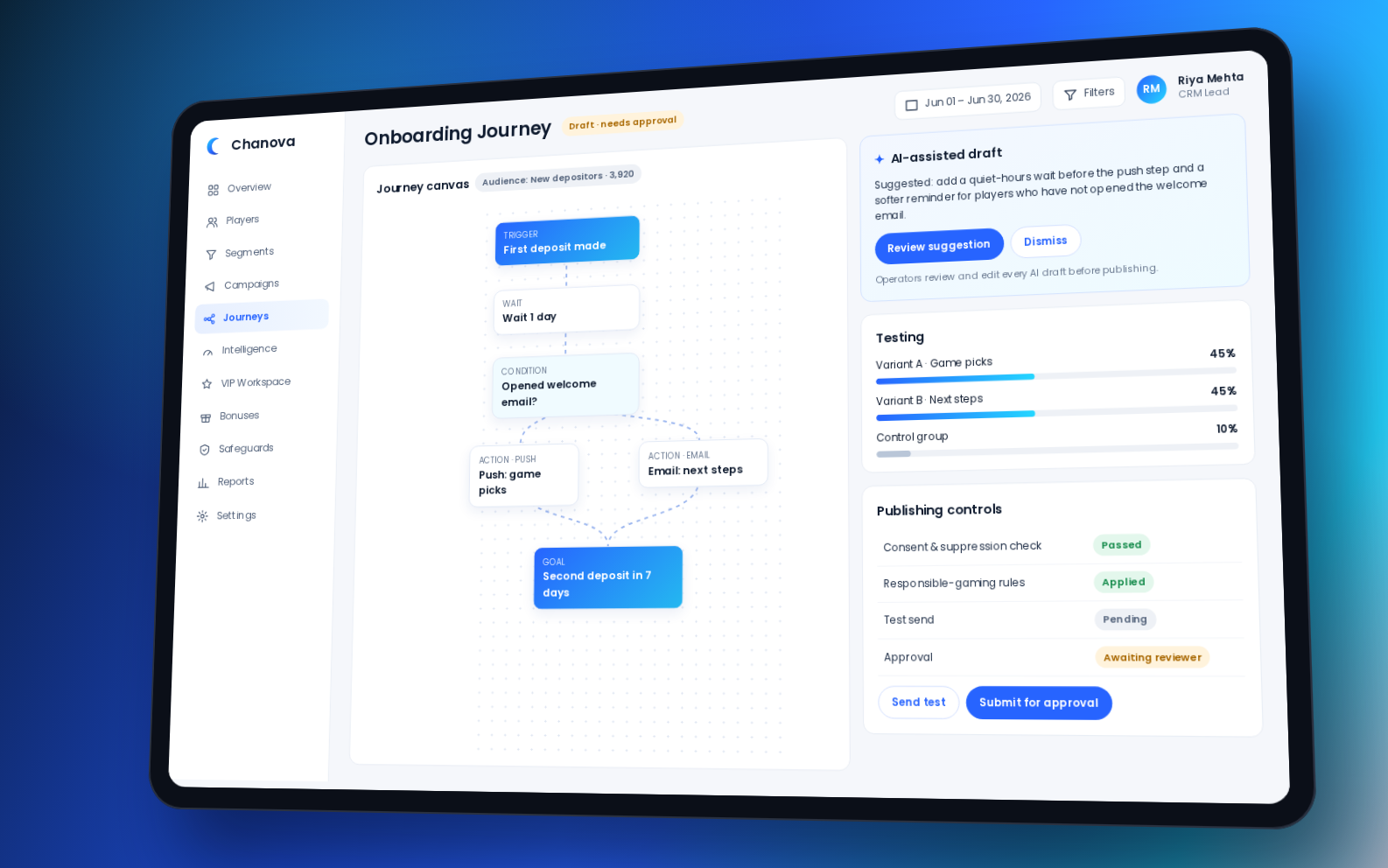
A typical journey starts with a trigger and an entry check. It then uses waits, conditions and branches to select an approved action. A goal or exit rule determines when that player's participation should end.
01Trigger and entry checks
Trigger. An event or audience change signals a possible entry. Examples include registration, an approved deposit, login, account-status changes, casino activity or sportsbook activity. Segment entry, VIP changes, mission completion and an inactivity condition may also provide signals. However, available triggers depend on connected systems and the CRM implementation.
Entry check. Confirm whether the journey is relevant and permitted for that player. Review brand, market, account status, audience membership, recent activity and existing journey participation. Also check the permissions and restrictions relevant to the intended action.
02Waits, conditions and branches
Wait. Hold the player until a defined duration, date, event or condition. Every event wait also needs a timeout path. Otherwise, an event that never arrives can leave the player waiting indefinitely.
Condition. Check the latest available player information before deciding what happens next. For example, has a successful deposit occurred, has the player returned, or is the account now restricted?
Branch. Route the player according to the condition result. A simple flow may have yes and no paths. Alternatively, it may branch by product preference, channel availability or another relevant condition.
03Actions, goals and exits
Action. Perform the selected step, such as approved communication, a reward request, a CRM update or human review. However, confirm which system owns and records the final result.
Goal. Define the intended outcome, such as a first deposit, qualifying return, product activity or completed VIP review. Reaching the goal should stop unnecessary follow-up.
Exit. End participation when the goal is complete, time expires, eligibility changes or another workflow takes priority. Also define an exit when no further approved action remains.
Each branch should change the operating decision. Adding nodes that repeat the same action makes the workflow harder to review without making it more useful.
Set Entry, Re-entry and Duration Rules
Repeated deposits, logins or inactivity events can trigger the same journey more than once. Therefore, choose a participation model before connecting actions. Confirm which models the proposed platform supports and how it handles active instances.
Use one-time participation for a unique stage, such as registration or first deposit. Once that journey ends, another matching event should not restart the same treatment.
Allow another entry only after the previous instance ends and the configured waiting period passes. This can suit repeatable engagement processes. However, a later entry must still be relevant and permitted.
Each accepted event may create another instance. If parallel instances are allowed, define contact limits and controls against duplicate actions. Otherwise, one player could receive overlapping messages or reward requests.
A new event may reset or replace an active journey. Before using this model, clarify what happens to pending waits, completed actions and outstanding provider requests.
Also set a maximum journey duration or reliable timeout for every wait. Use a period that suits the workflow's purpose. One standard duration will not fit registration, reactivation and VIP review equally well.
Connect Events With the Player's Current Context
An event records something that happened. A segment describes audience membership under defined rules. A journey may use the event as its trigger and the segment as an entry condition.
For example, an approved deposit event might start a journey only when the player belongs to the new-depositor audience. The account must also remain active, and the intended communication must be permitted. The event alone does not settle those decisions.
Similarly, entry to an approved inactivity segment can trigger reactivation review. If the player later returns and leaves that audience, the journey may need to stop or change path. Therefore, define how membership changes affect both entry and continued participation.
Handle late, duplicate and corrected events
Events may arrive late, repeat or change after processing. Ask how the platform identifies duplicate events, resolves event order and handles corrected records. Also confirm what happens when player identifiers are missing or inconsistent.
Test these cases against a real workflow. For example, replaying one deposit event should not create an unintended second enrolment or repeat a reward request. A correction should produce a traceable result rather than silently change what operators believe happened.
Keep Communication, Rewards and Human Review Separate
A journey can coordinate several action types. However, they do not all share the same execution owner or success condition.
Communication actions
Communication may use email, SMS, push, WhatsApp, in-app messages or other configured channels. Availability depends on providers, implementation scope, market and player permissions.
The CRM selects the audience, content, timing and workflow logic. The messaging provider performs delivery and returns its result. Therefore, distinguish queued, delivered, failed and pending actions. A failed send does not count as completed engagement.
Reward and offer requests
The CRM may select an approved bonus, free bet or reward. Next, the connected platform validates account and offer eligibility. The bonus engine, wallet or relevant system fulfils and records the financial outcome.
Return acceptance, rejection, settlement or reversal information to the journey where applicable. This keeps the CRM from becoming a second financial ledger. Also distinguish a submitted reward request from confirmed fulfilment.
CRM updates and operational handoffs
A journey may update a CRM-owned field, add or remove a tag, change an audience or notify a team. It may also start another workflow, stop a conflicting one or record an outcome. However, distinguish CRM-owned changes from requests that depend on another system.
Human review may be appropriate for VIP decisions, unusual behaviour, sensitive offers or player-protection cases. The reviewer needs the routing reason, relevant context and available approved actions. Then record the decision and whether the journey should continue, remain paused or exit.
Recheck Eligibility Before an Action Executes
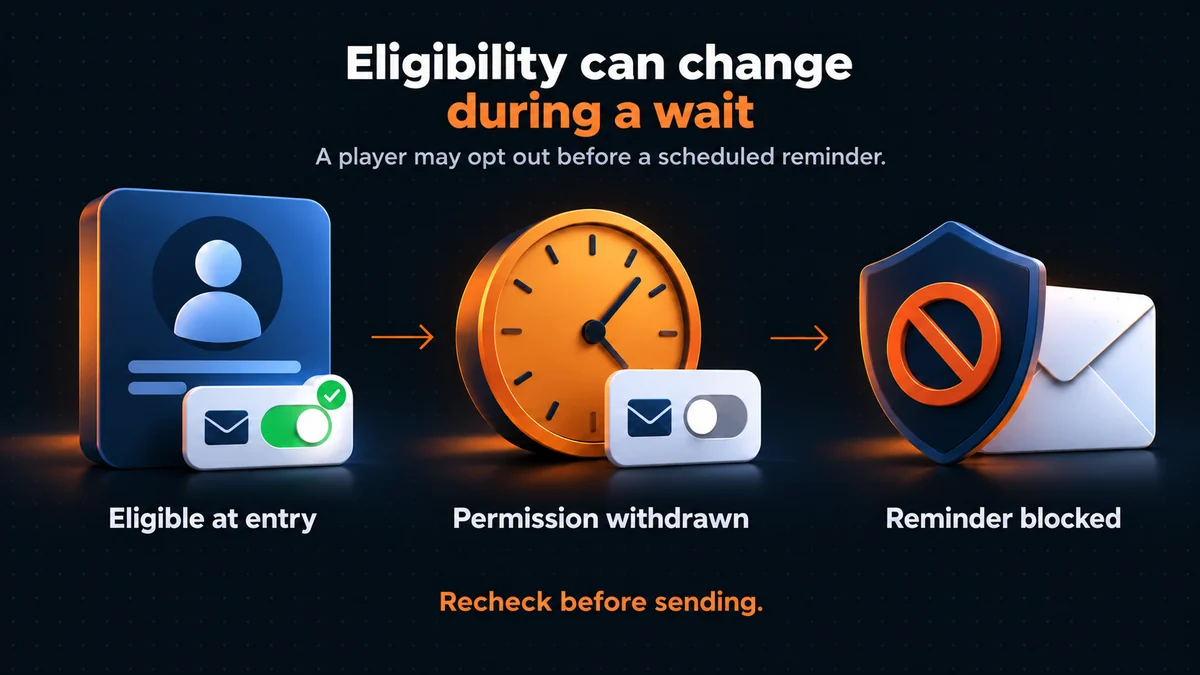
Journey entry and action execution are separate decisions. A player may qualify initially, then opt out, self-exclude or become account-restricted during a wait. Therefore, later actions must use the current approved eligibility information.
Review the relevant controls:
- Contact permission: channel and purpose, opt-outs, suppression and channel availability.
- Player protection: self-exclusion, account restrictions and applicable responsible-gaming review.
- Timing and frequency: recent contact, contact limits, quiet hours and conflicting activity.
- Operating scope: brand, market, product access and offer eligibility.
- Approval: required reviews for the content, reward or proposed action.
For example, a player may withdraw permission after a message enters a queue. Check how the implementation prevents dispatch after that restriction arrives. Apply the same current-state principle before submitting sensitive reward requests.
If required eligibility information is missing, use the approved blocking or review path. Do not treat an unknown permission as consent. Workflow software supports operator controls; it does not guarantee compliance in every market.
Prevent Overlapping Journeys and Conflicting Contact
A player can qualify for onboarding, retention, VIP review and promotional activity at the same time. Without priority rules, separate workflows may produce excessive or contradictory contact.
Set priority and exclusions. Specify which journey takes precedence and which workflows cannot run together. Also decide whether a new journey pauses or ends an existing one.
Coordinate contact limits. Apply recent-contact exclusions and frequency controls across the relevant journeys and channels. A limit inside one flow may not prevent another flow from contacting the same player.
Resolve shared goals. If several journeys pursue the same outcome, define which one owns the treatment and when the others should stop. Otherwise, a completed goal may still leave redundant follow-up active.
For example, personal VIP review may take priority over broad automated reactivation. The approved rule can pause commercial follow-up until the review ends. However, commercial priority must never override player-protection restrictions.
Keep control groups free from equivalent exposure
A control group contains eligible players intentionally withheld from the journey or selected action. Compare their outcomes with the exposed group under the defined experiment.
Also protect control-group members from equivalent contact through another campaign or journey. Record assignment, the observation period, the selected outcome and any later exposure. Otherwise, the comparison may no longer isolate the treatment being evaluated.
Examples of Automated Player Journeys in iGaming
These examples illustrate operating decisions, not recommended thresholds or guaranteed outcomes. Set conditions and time periods for the operator's products, markets, policies and available data.
Registration and first-deposit journeys
Registration journey. Start after an eligible registration and check whether the required next step has occurred. Depending on the result, continue approved onboarding, route for assistance or exit.
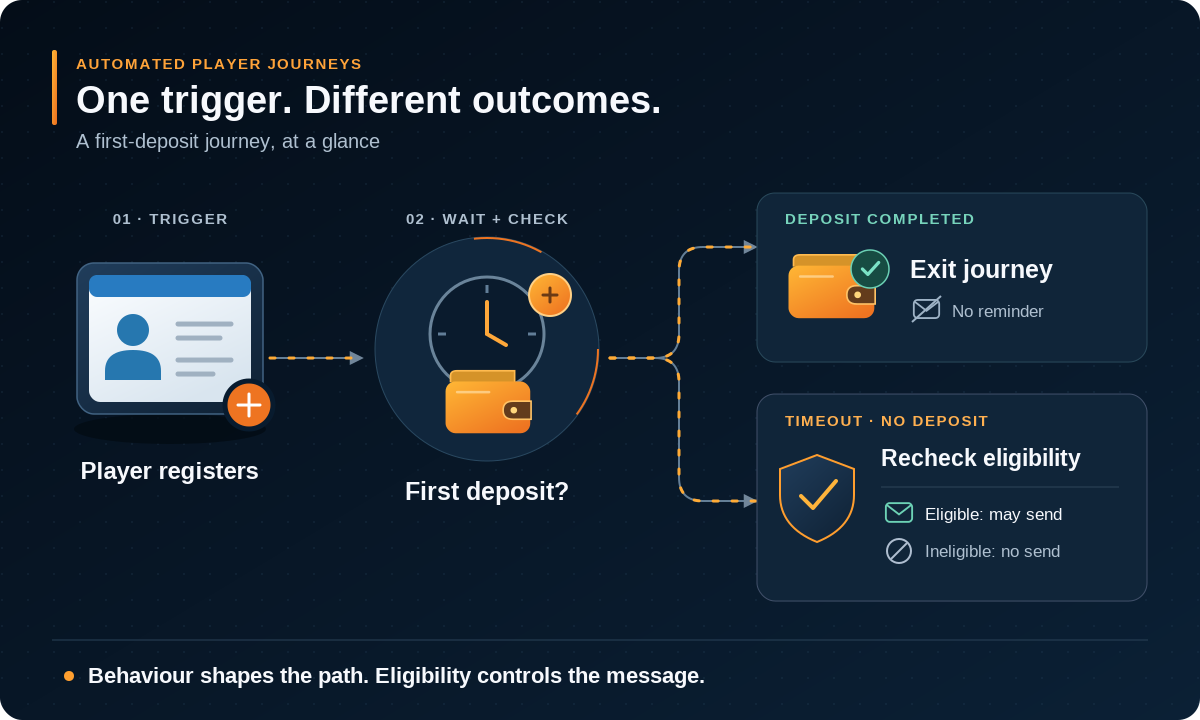
First-deposit journey. Start with an eligible registrant who has not completed a successful deposit. Wait for the qualifying event. If it arrives, end the deposit-follow-up path and assess any separate early-engagement treatment.
If the wait expires first, recheck permissions, account status and competing workflows. The next step may be approved guidance, a reminder, support or an exit. However, a failed or pending transaction must not count as a successful deposit.
Early engagement and failed-deposit journeys
Early-engagement journey. A completed first deposit can provide the entry event. Then check later return activity or product use before selecting a relevant follow-up. Stop or change treatment when the intended outcome occurs.
Failed-deposit journey. An approved failure event can start a support-oriented workflow. Check whether the problem is resolved before any further guidance. Also confirm the transaction's authoritative status; do not turn every failed attempt into a promotional opportunity.
Lapsing-player and reactivation journeys
Lapsing-player journey. Use a meaningful decline against the player's defined activity baseline. Then check whether engagement has recovered. An eligible player may exit or continue into a controlled retention action.
Reactivation journey. A previously active player enters an approved inactivity audience. After entry checks and permitted communication, wait for a qualifying return event. If the player returns, exit or consider a separate post-reactivation path.
If inactivity continues, assess whether another approved step remains relevant. Also stop when eligibility changes, the duration limit is reached or a higher-priority workflow takes over.
VIP review and cross-product journeys
VIP review journey. A priority indicator, status change or meaningful activity change can create a personal review. The manager checks behaviour, value, communication history, offer eligibility and restrictions. The decision may be personal contact, an approved workflow, continued monitoring or no action.
Cross-product journey. Relevant activity in one product may justify assessing interest in another. However, first check product access, preferences and permissions. Select a controlled path only when the proposed treatment is appropriate.
Test Every Path Before Publishing
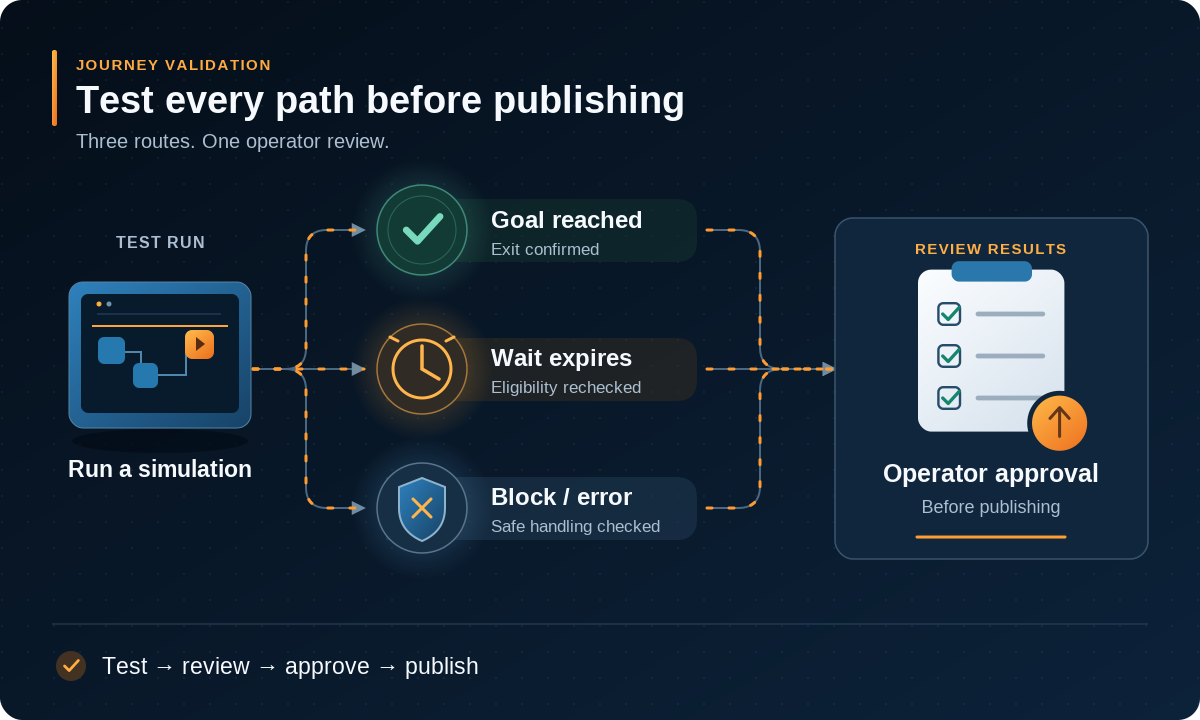
Test the journey as an operating process, including events, current-state checks and provider results. A flowchart that looks complete can still fail when a player becomes ineligible or a service returns an error.
Cover successful and unsuccessful paths
Use controlled records to test:
- Matching and non-matching triggers, plus passed and failed entry checks.
- Every branch, including an event arriving before timeout and the timeout occurring first.
- Completed goals, changed eligibility and correct exits.
- Provider failures, rejected rewards and visible results from retries.
- Duplicate enrolment attempts, repeated events and event corrections.
- Conflicting journeys, expired waits and the absence of any further approved action.
First, use a dry run to inspect progression without live messages or rewards. Next, use approved test records and configured test providers to verify execution results. A simulated path and a confirmed delivery or fulfilment are different kinds of evidence.
Define what a published change does
Publish changes through a controlled versioning model. Establish whether existing players remain on their original version and new entrants use the latest one. Also define whether a critical change requires migration or termination.
Review pause, resume and archive behaviour. For example, confirm what happens to a wait, an outstanding provider request and an enrolled player during a pause. Previous versions and their results should remain understandable during review.
Approve the complete operating plan
Assign the relevant CRM, product, VIP, commercial or player-protection owners. The review should cover audiences, content, offers, providers, entry, exits, safeguards, measurement and escalation.
Finally, avoid changing live logic without a clear version or migration policy. Extra branches, repeated enrolments and unconfirmed provider results also make the journey harder to operate. Resolve those issues before release.
Measure Progression and Outcomes Separately
Start with a defined goal and observation window. Then follow the eligible audience through enrolment, exposure, progression and outcome. Without that sequence, delivery activity can look like success even when the intended result never occurs.
eligible players, enrolments, active instances, node counts, branch distribution, waiting time, timeouts, errors, retries and exits. These measures show whether the workflow behaves as intended.
queued and delivered messages, provider failures, opens, clicks, channel responses, opt-outs and contact frequency. However, these measures do not establish commercial impact by themselves.
completed goals, successful deposits, qualifying returns, product use, reactivation, completed VIP reviews or resolved support issues. Where appropriate, compare exposed players with the assigned control group.
Also document how other campaigns affect attribution. A player may return after several interactions, so one journey action should not automatically receive full credit. Automated workflows support measurement; they do not guarantee retention, deposits, revenue or ROI.
What Should Buyers Evaluate in a Journey-Automation Platform?
A visual builder is only one part of the purchase decision. Instead, assess whether the complete operating lifecycle fits your systems, data and review process.
Which events and segment changes can trigger entry? Can teams combine account, market, audience and permission checks? Also confirm one-time entry, re-entry, parallel instances and restart behaviour.
Review waits, timeout paths, branches, actions, goals and exits. Confirm which providers and reward connections are available. Ask how updated player information, missing events, failed sends and rejected actions affect progression.
Test current-state restrictions, consent, suppression and contact limits. Also review priority rules, mutual exclusions and overlaps across channels or journeys.
Ask for dry runs, controlled tests, versioning, roles, approvals, ownership and audit records. Determine what happens to enrolled players after a published change.
Review node progression, goals, provider results and outcome reporting. Then request validated event latency and scale for realistic workloads. A claim of “real time” does not replace measured performance evidence.
During a demonstration, ask the vendor to build one realistic journey with controlled players. Apply a new suppression during a wait, force a provider failure and publish a changed version. Finally, inspect the player states, execution records and reporting together.
How Chanova Supports Automated Player Journeys
Chanova supports multistep workflows with triggers, waits, conditions, branches, message and bonus actions, A/B splits and exits. Its approved journey documentation also describes versioned enrolment, test runs, dry-run simulation, player states and statistics.
Players continue through their entry version, with publish, pause, resume and archive controls for the journey lifecycle. However, communication and reward execution depend on configured providers and connected operator systems. Confirm the available scope and behaviour during technical discovery.
AI can assist with campaign and journey drafting. Operators still review, edit, test, approve and publish the resulting workflow. Therefore, proposed automation should remain an operator-controlled decision rather than autonomous execution.
Conclusion
Automated player journeys in iGaming work best when each step has a clear purpose and an accountable execution owner. Reliable triggers, current eligibility, meaningful branches, controlled participation and explicit exits keep the workflow understandable as player activity changes.
Therefore, start with one useful journey and test its complete operating path before expanding it. Evaluate the events, providers, safeguards, versioning and reporting against your own requirements. A journey should remain useful and measurable even when the correct next action is to stop.
Frequently Asked Questions
01What is an automated player journey in iGaming?
It is a multistep CRM workflow that responds to an eligible player's events and current status. It uses entry checks, waits, conditions, branches and approved actions. For example, a return event may end a reactivation path. Goals, timeouts and eligibility changes determine when participation stops.
02What is the difference between a campaign and a player journey?
A campaign usually coordinates communication for a defined audience or moment. In contrast, a journey manages individual progression over time. It can wait for later activity, select a different branch or stop when a goal occurs. Campaigns and journeys can also support the same wider initiative.
03Which events can trigger an automated journey?
Possible triggers include registration, approved deposit activity, login, account changes, casino or sportsbook activity and segment entry. VIP changes, mission completion or an inactivity condition may also provide signals. However, availability depends on connected systems. Combine the trigger with relevant entry and eligibility checks.
04Can a player enter the same journey more than once?
That depends on the configured participation model. It may allow one-time entry, re-entry after completion, a new instance per qualifying event or a restart. Therefore, define repeat-entry, parallel-instance and duration controls before publishing. Weak rules can produce duplicate messages, repeated requests and unclear reporting.
05How should waits, branches and exit rules work?
A wait needs a defined duration, date, event or condition, with a timeout when required. Then evaluate updated player information to choose a meaningful branch. Exit when the goal is complete, eligibility changes, time expires or another workflow takes priority. Also stop when no further approved action remains.
06When should consent and self-exclusion be checked?
Check relevant permissions and restrictions before entry and again before sensitive actions execute. A player may opt out or become restricted during a wait. Therefore, use current approved information and confirm how queued actions respond to later restrictions. Unknown eligibility should follow the approved blocking or review path.
07How should operators test and measure a journey?
Test triggers, entry checks, branches, timeouts, goals, restrictions, failures and exits. First, inspect logic with a dry run. Next, verify results with approved test records and providers. Measure exposure, progression and the intended outcome within a defined observation window. Opens and clicks alone do not prove incremental impact.
08What should buyers evaluate in an iGaming journey builder?
Evaluate the complete lifecycle: entry, repeat participation, waits, decisions, actions, goals, exits, providers and failure handling. Also inspect safeguards, overlapping journeys, testing, versions, approvals and reporting. Ask for a demonstration with an ineligible player, changed permissions, a provider failure and a new version.